Equipment booking
Growth plan and upBook with confidence. Use without conflict.
LevelSixLabs's booking system makes it easy to reserve equipment and rooms, enforce training requirements and avoid double bookings. Real-time availability, QR check-in and mobile access keep your lab running smoothly.
- QR-code booking & check-in
- Real-time availability
- Training & access control
- Conflict detection
- Day / Week / Month views
- Side-by-side overlap layouts
Bookings · Week view
+ New bookingCentrifuge
You · 09–10:30
CFX96 PCR
James P. · 11–12:30
Room 2.15
Lab meeting
−80 freezer
Olivia M. · 09–11
Microscope
Sarah K. · 13–14
Centrifuge
You · 13–14:30
Autoclave
Maintenance
Scan to book
Scan an equipment QR code from your phone to see availability and book in seconds.
Training gates
Block bookings unless the user has a valid, in-date training record for the kit.
Live availability
See real-time status of every piece of equipment and room across all your sites.
Mobile first
Built to work brilliantly on a phone — because you're rarely sitting at a desk.
Conflict + fault gates
Conflict detection prevents double bookings. Plus: a fault on a piece of kit can auto-block new bookings until it's fixed.
Equipment Smart Lookup
Search by manufacturer, model or common name. LevelSixLabs suggests structured data — name, model, service intervals, training and safety notes — that you review before applying.
Day · Week · Month — your call.
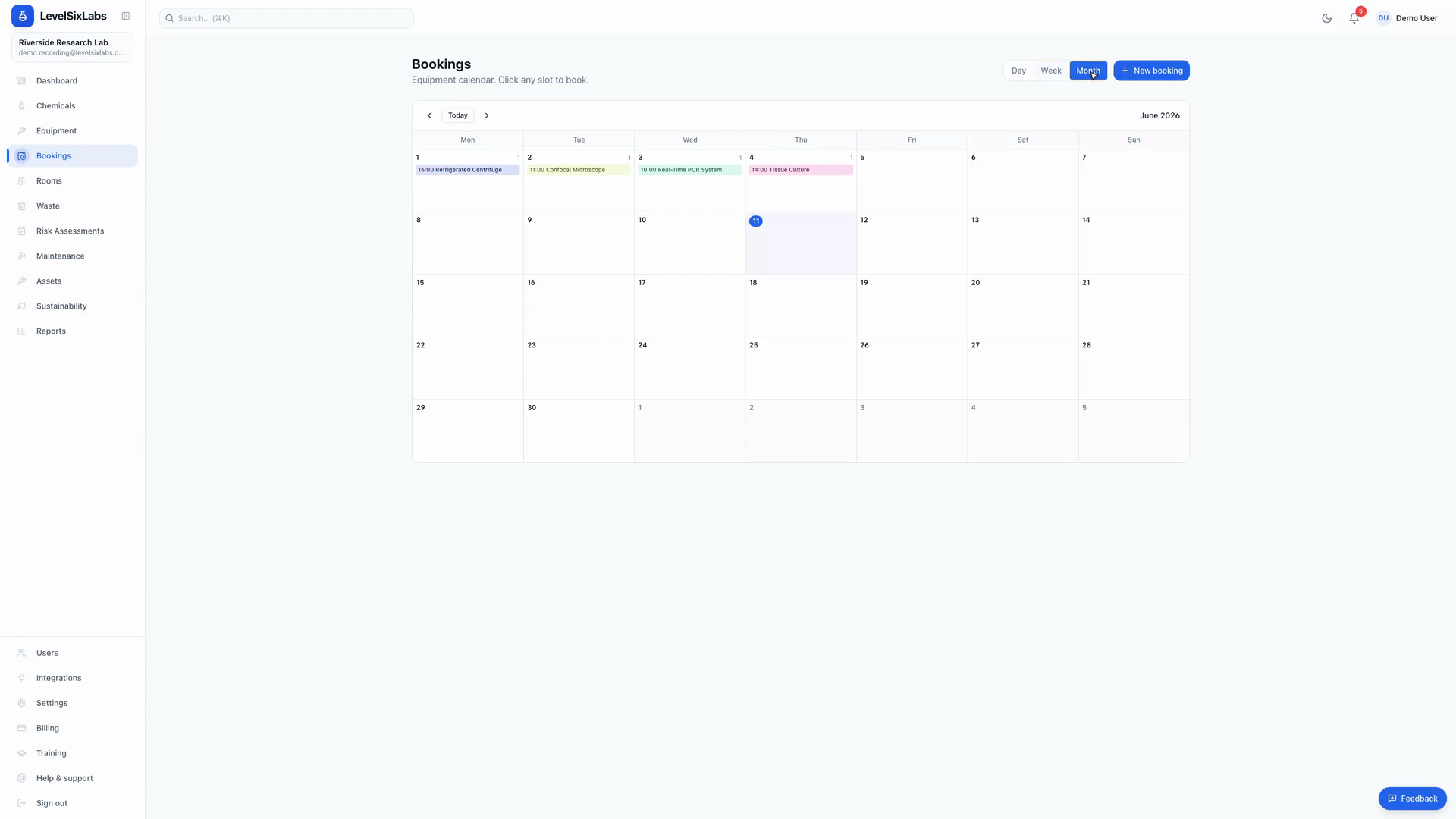
Switch view in one click. URL-driven state means a calendar link always opens at the right view, on the right day. Side-by-side layout handles overlapping bookings cleanly — no more guesswork.
See it in action
Book the right kit, with no clashes
Pick equipment or a room, see live availability, and let the calendar block double-bookings and gate training-required kit automatically.
- Day, week and month calendar views
- Real-time conflict detection
- Training-gated equipment so only competent users book
Equipment & room booking — common questions
How does it stop double-bookings?+
Overlapping bookings for the same equipment or room are rejected — checked when you book for a clear 'clashes with…' message, and enforced at the database level so two people booking at the same instant can't both succeed.
Can we require training before someone books a piece of kit?+
Yes. Mark equipment as training-required and only people with a valid (non-expired) training record can book it. Untrained users see it locked in the picker, with a clear reason.
What calendar views are there?+
Day, week and month, with overlapping bookings shown side by side and stable per-item colours. State is in the URL, so you can share a link to a specific view.
Can people book from their phone?+
Yes — the calendar is mobile-first, and you can scan a QR code on a piece of equipment to open it and book on the spot.
Does booking sync with Outlook or notify Slack or Teams?+
Optional integrations exist: bookings can post to a Slack or Teams channel, and every member can subscribe to a read-only calendar feed that shows their bookings in Outlook, Google or Apple Calendar. Channel posts are off by default and configured per organisation in Settings.
See how simple booking can be
Stop double-bookings and missed sessions.
Start your 14-day free trial. Set up your first room or piece of equipment in minutes.