Mobile & QR Workflows
All plansBuilt for the bench, the lab, the field. Not a desk.
Labs aren't desk jobs. LevelSixLabs is built mobile-first — every page works beautifully on your phone, every QR code links to instant actions, every form is one tap away.
- QR-coded equipment & chemicals
- One-tap booking & check-in
- Photo-based fault reporting
- Mobile-optimised every page
- Add to home screen (installable PWA)
- Works on any modern phone
Scan QR code
Eppendorf Centrifuge 5427 R
Available now
Scan. Book. Done.
Stick a QR code on every centrifuge, autoclave and freezer in your lab. A team member walks up, scans with their camera, and gets an instant booking screen, the service history, the SDS — whatever they need.
Printable QR sheets
Generate a printable sheet with QR codes for every piece of equipment. Stick and go.
No app to install
Works in any modern phone browser. Optionally add to home screen for one-tap access.
Photo fault reports
Snap a photo of a broken instrument. Severity, description and status update auto-shared with admins.
Mobile calendar
Day / week views compress beautifully on phones. Tap to see details, swipe to navigate.
Live notifications
Expiring chemicals, training renewals, open faults, upcoming bookings — all in your pocket.
SDS on demand
Need a Safety Data Sheet? Search the chemical on your phone and open the SDS straight from its record. Done.
Touch-friendly UI
Big tap targets, smooth scrolling, drawer navigation — feels native on any phone.
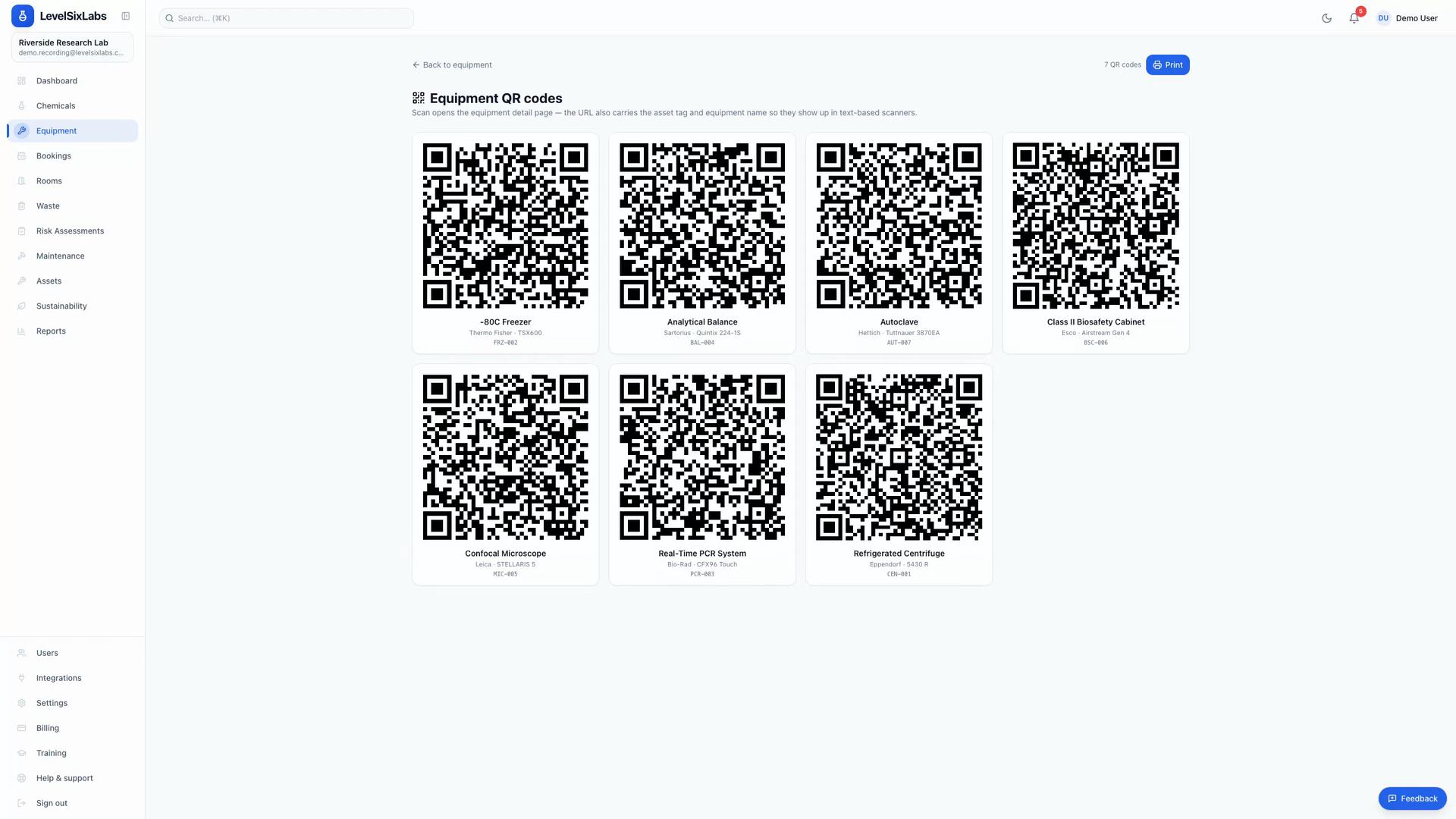
See it in action
Scan a label, open the record
Recorded in the real app: print a QR sheet for your equipment, then scan any label from a phone to open its record, book it or report a fault — straight from the bench, no install needed.
- Printable QR sheet for all your equipment
- Per-item QR opens the live record
- Installable as a home-screen app (PWA)
QR & mobile workflows — common questions
Do staff need to install an app?+
No. LevelSixLabs runs in the phone's browser. Scan a QR code or open a link and you're in — there's nothing to install or update.
How do we get QR codes onto our equipment?+
Print them from the app: the equipment register's Print labels produces a Word document laid out on a real Avery label sheet (pick the template code that matches the sheet in your printer). Print, stick them on the kit, done. You can still download a single code from the machine's own page.
What can someone do after scanning?+
The QR opens that equipment's record — they can view its details and service history, book it, or report a fault, all from the phone.
Can it be added to a phone's home screen?+
Yes. LevelSixLabs is an installable PWA, so it can be added to the home screen and opened like an app, with an offline fallback page.
Built for the bench
Get LevelSixLabs on every phone in your lab.
Free 14-day trial. Print a QR sheet. Watch your team go mobile in an afternoon.